1Panel v2.5.0 Released: Rebuilt GPU Management, vLLM, and Model Services Across the Whole Local Model Workflow
1Panel v2.5.0 rebuilds GPU management, vLLM management, and model services to connect model preparation, deployment, monitoring, benchmarking, and AI gateway access. Virtual machine management opens up to Community Edition, operations reports to Professional Edition, and the release adds 1Panel MCP service management, container image update detection, and batch upgrades.
1Panel v2.5.0 is now available. This release rebuilds GPU management, vLLM management, and model services to connect the entire local model deployment workflow — from model preparation, deployment, and monitoring to benchmarking and exposing models through the AI Gateway. Virtual machine management is now fully available to Community Edition users, operations reports are available to Professional Edition users, and the release also introduces 1Panel MCP service management, container image update detection, and batch upgrades.
On November 11, 2026, 1Panel, the next-generation Linux server management panel, officially released v2.5.0.
1Panel v2.5.0 focuses on improving the local model deployment experience. It connects the full loop from GPU management, model preparation, model deployment, and model services to benchmarking and exposing Token services through the AI Gateway. With the new version, users can quickly deploy and manage local models on AI servers and complete environment checks, deployment configuration, and runtime monitoring directly in the panel, reducing repeated context switching between different tools.
At the same time, 1Panel v2.5.0 makes virtual machine management fully available to Community Edition users, opens operations reports to Professional Edition users, and adds practical capabilities such as 1Panel MCP service management and container image update detection with batch upgrades, continuing to improve the server management experience.
Existing users can click Check for updates in the lower right corner of the panel to upgrade online. For the complete changelog, see the v2.5.0 release.
Thank you to the community for your continued feedback and support. 1Panel looks forward to building a more efficient, secure, and intelligent Linux operations experience with you.
Table of Contents
Highlights
Rebuilt GPU management
Before deploying a local model, you first need to confirm that the GPU is recognized correctly and that the driver and container runtime are ready. 1Panel v2.5.0 completely rebuilds GPU management, presenting device information, environment status, and both real-time and historical monitoring in a unified interface so users can understand the current device’s capabilities and operating condition at a glance.
For NVIDIA devices, users can check the driver and NVIDIA Container Toolkit status directly in the panel and view the corresponding installation and configuration guidance. For devices from other vendors, the panel provides the relevant environment diagnostics to help users determine what preparation work remains.
Once a model is running, users can view real-time metrics such as GPU utilization, memory usage, temperature, and power draw, and observe load changes through historical curves. Each device displays the metrics it supports, making it easier to investigate resource contention or high load and to inform deployment adjustments.
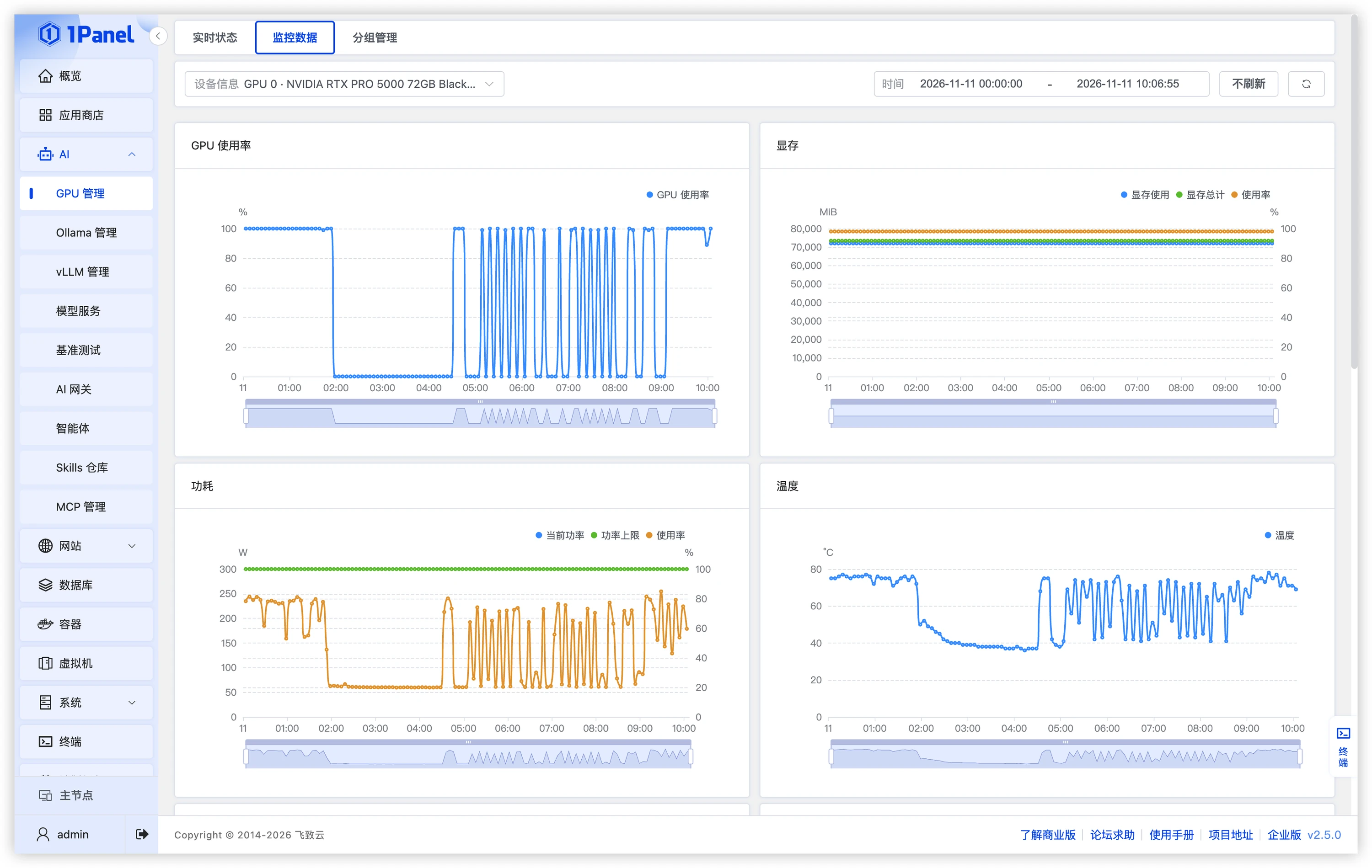
Figure 1: 1Panel GPU management and monitoring
Curated models, model downloads, and vLLM Recipes
With the growing number of open-source models, choosing a model, finding where to download it, and configuring startup parameters are questions users must answer before deployment.
1Panel v2.5.0 connects curated models, model downloads, and vLLM Recipes so that model preparation is based on clearer references. Users can review model specifications, applicable scenarios, and weight sizes from the curated model list, then move into the download workflow to prepare the local files required for deployment. Download tasks and local model files can be managed centrally, making them easier to find and reuse later.
For models that need reference startup configurations, users can also view the deployment configuration examples provided by vLLM Recipes and adjust parameters based on target hardware, model version, and runtime environment, reducing the effort of building a configuration from scratch.
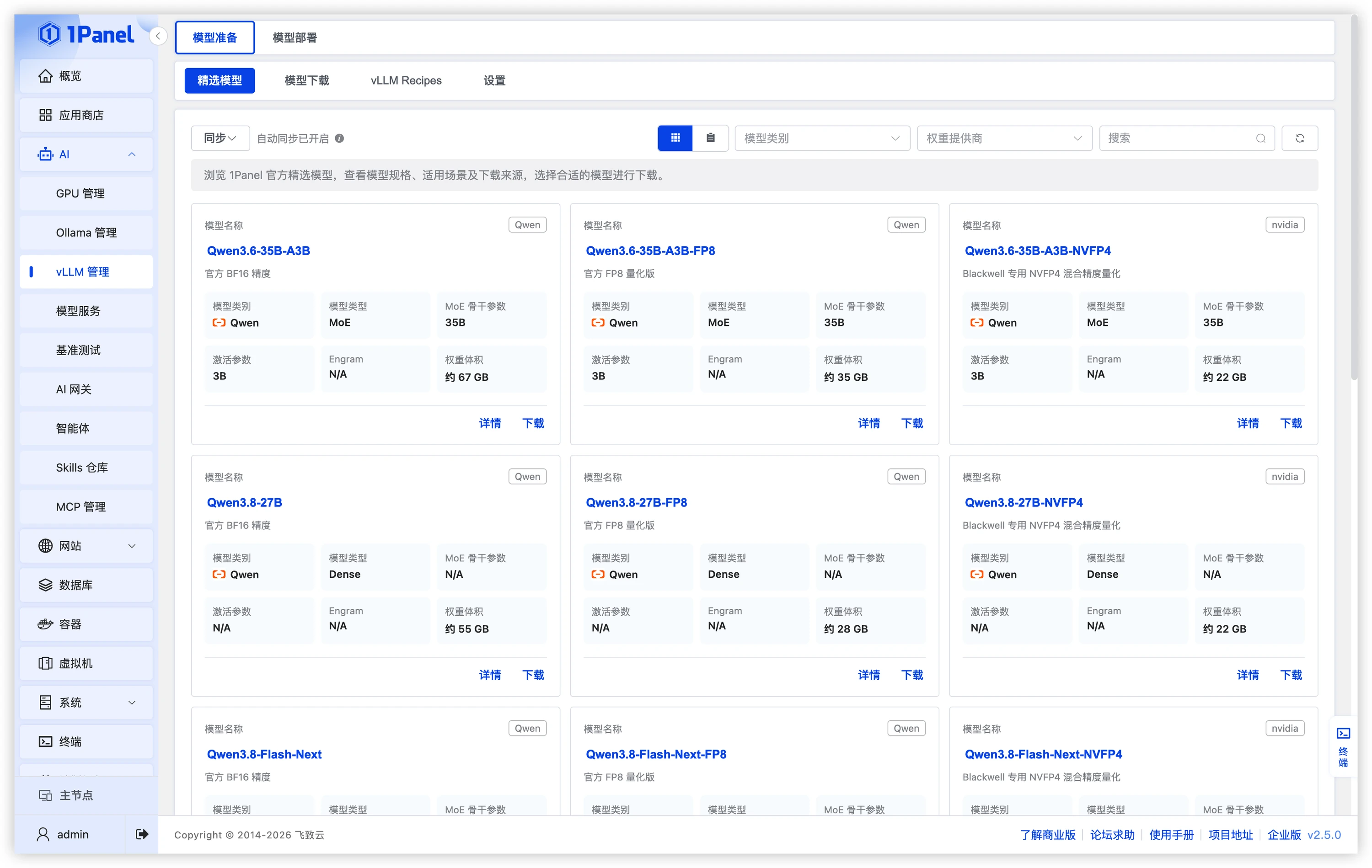
Figure 2: 1Panel curated models, model downloads, and vLLM Recipes
Rebuilt vLLM management for clearer deployment configuration and runtime monitoring
Once model files are ready, the next step is to get the model running reliably. 1Panel v2.5.0 completely rebuilds the vLLM management module, refining the workflow around instance creation, deployment configuration, and runtime monitoring so users can organize deployment operations around the selected model and hardware environment. When creating an instance, users can select the runtime image, model files, and startup template, and configure GPU and model startup parameters.
After the instance is running, users can view model status and logs in one place and use the monitoring page to review request volume, Token throughput, and response latency. Combined with GPU resource usage, this makes it easier to observe service load and provides a basis for subsequent deployment parameter tuning.
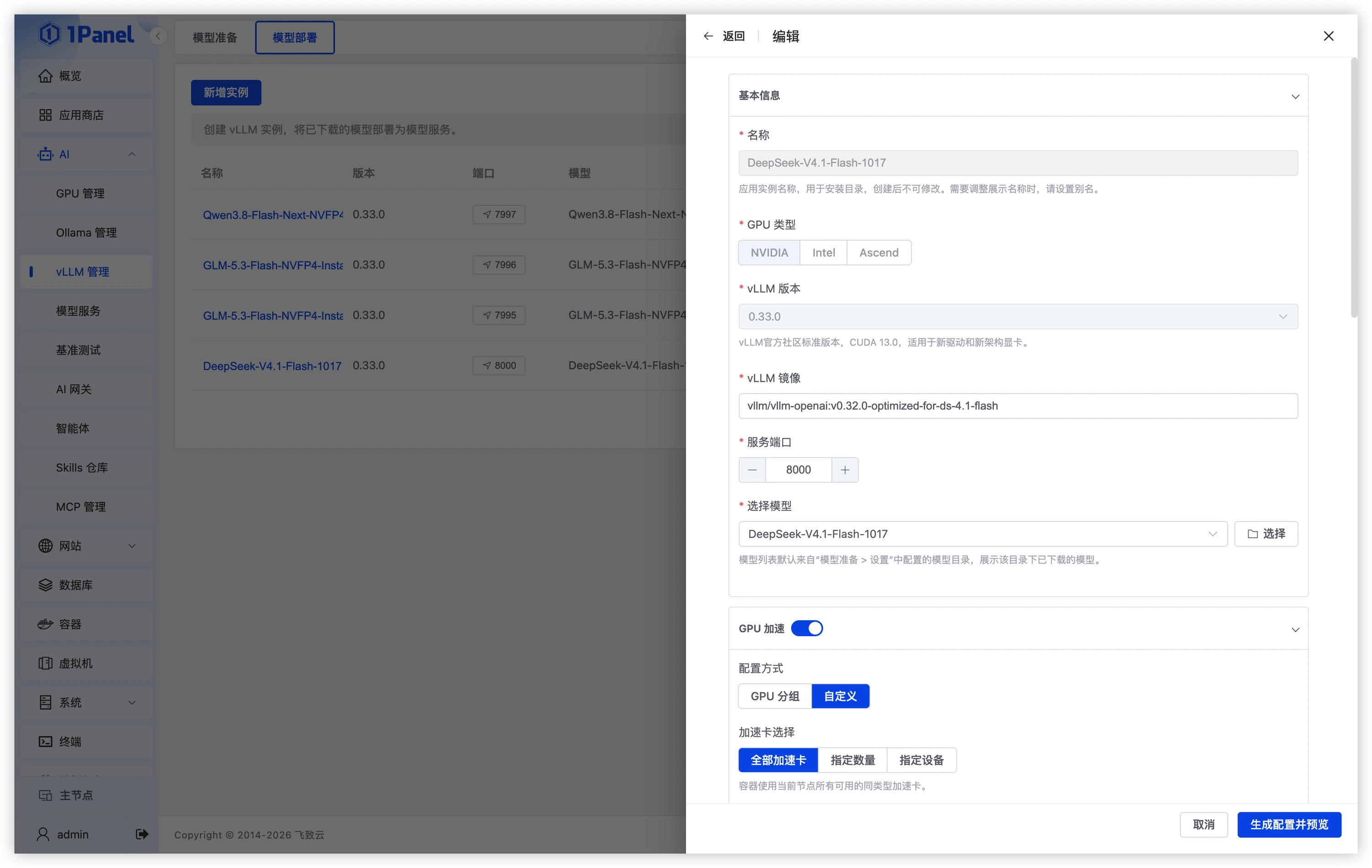
Figure 3: 1Panel vLLM instance deployment
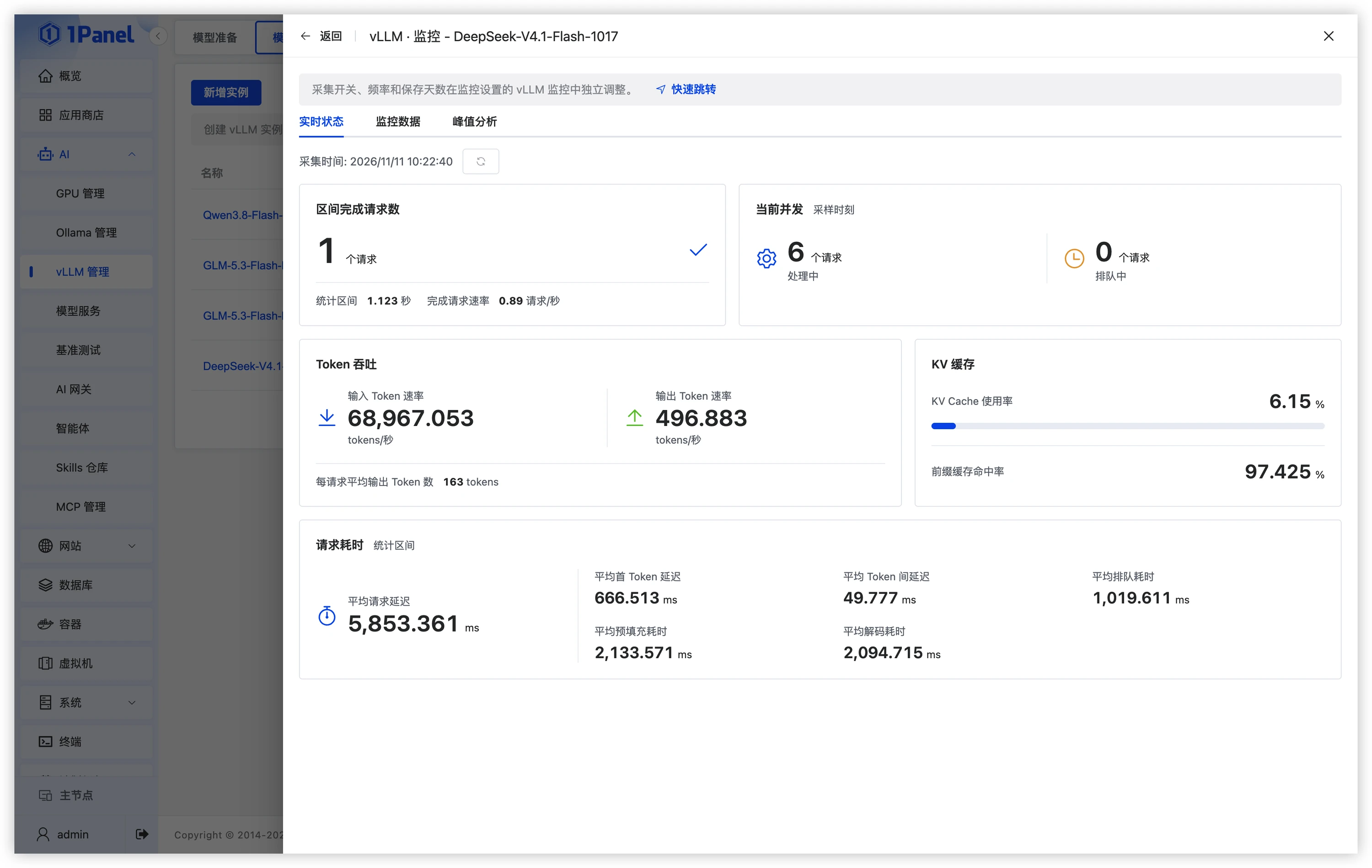
Figure 4: 1Panel vLLM inference monitoring
Unified management of local models, public cloud, and self-hosted AI gateway accounts
In practice, locally deployed models, public cloud models, and self-hosted AI gateways often coexist. 1Panel v2.5.0 completely rebuilds the Model Services module and centrally manages local model services, public cloud model accounts, and model accounts from self-hosted AI gateways, making it easy to review and maintain model services from different sources.
Users can configure connection addresses and access credentials by service source, view the model list under each account, and verify connectivity. Once deployment and onboarding are complete, service information and available models are clearer, providing a unified selection entry point for later use and benchmarking.
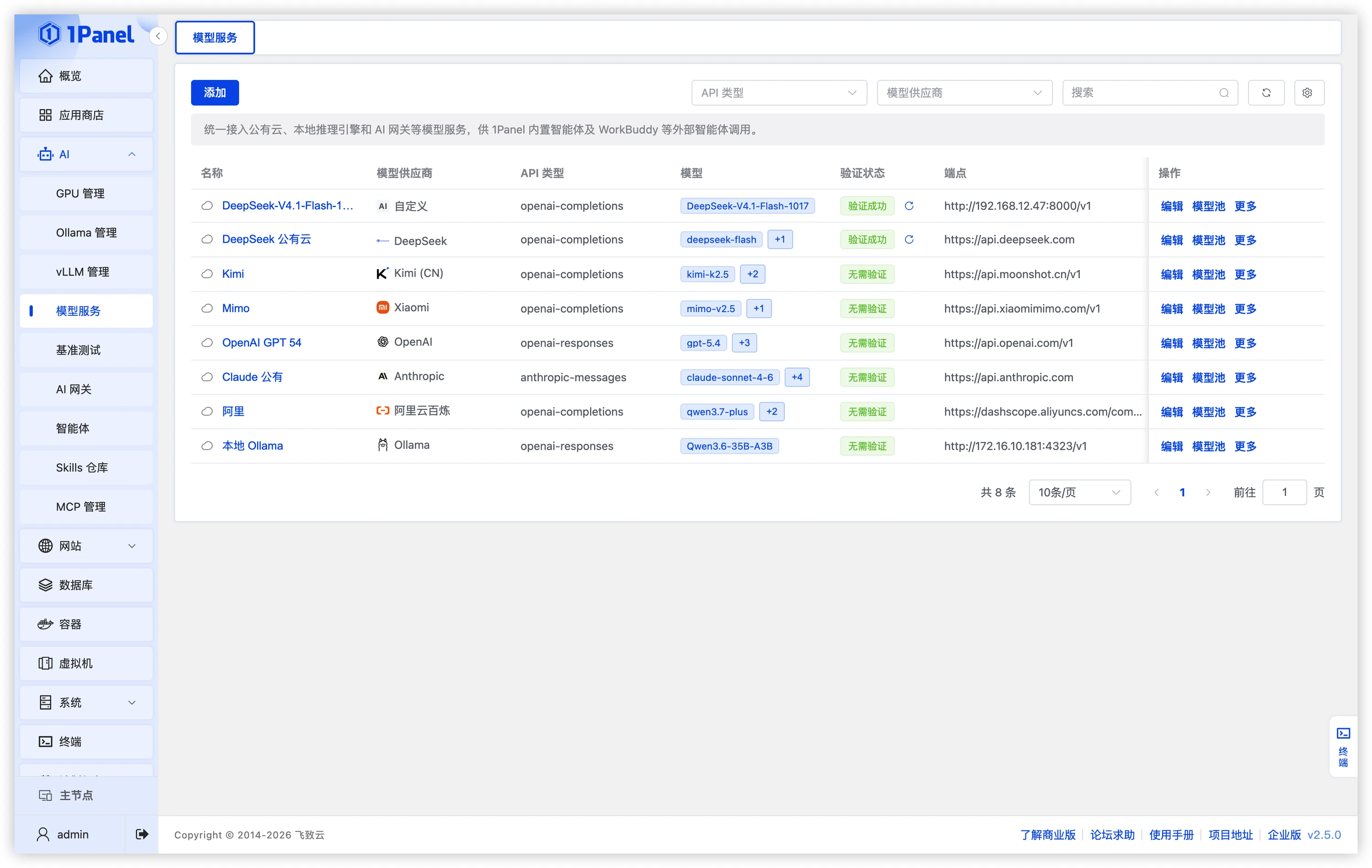
Figure 5: 1Panel model services management
Built-in benchmark presets
After a model goes live, users typically need to understand its behavior under real workloads, including time to first token, sustained output speed, and throughput as concurrency increases. 1Panel v2.5.0 provides model service benchmarking: users select a target service and model, then launch a focused performance test using presets such as quick validation, standard test, and full test.
Users can adjust request length, output length, and concurrency, and review results such as time to first token (TTFT), request latency, and Token throughput. Testing different deployment configurations with the same preset helps users track the impact of parameter changes and provides a reference for resource planning and service tuning.
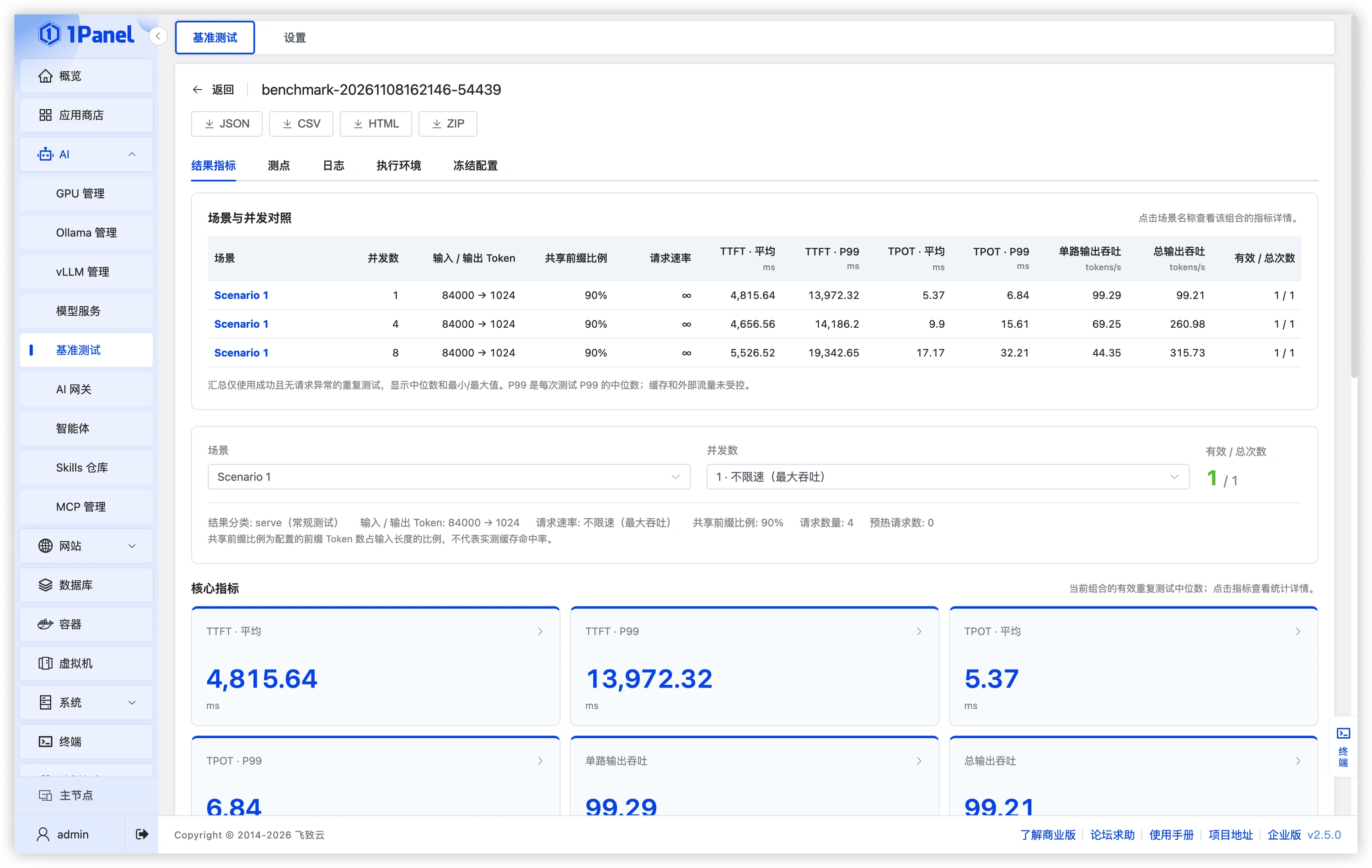
Figure 6: 1Panel model service benchmark configuration and results
More New Features
- Virtual Machines — Virtual machine management is now available to Community Edition users.
- Overview — Added a GPU status view and vLLM Token throughput monitoring, plus support for multiple directory shortcuts.
- Agents — Added support for DeepSeek Harness and OctoP.
- MCP Management — Added 1Panel MCP service management.
- Websites — Reverse proxy timeout can now be configured in performance tuning.
- Certificates — Issued certificates can be pushed to multiple local directories at once, and self-signed root certificates can be imported.
- Containers — Container directories support batch file uploads.
- Containers — Added container image update detection and status indicators, and the container list supports batch upgrades.
- Containers — Added support for searching remote images on Docker Hub.
- Containers — Added a switch for NVIDIA GPU runtime configuration.
- Cron — URL access tasks support setting the User-Agent request header.
- Resource Sync — PHP extension templates can be synchronized across nodes.
- Ops Report (X-Pack) — Operations reports are now available to Professional Edition users.
- Multi-Node (X-Pack) — Nodes can be installed and upgraded using existing installation packages.
Enhancements
- App Store — Local app synchronization now supports including child nodes, the image prefix can be configured and enabled independently, and resource requests during synchronization are reduced.
- Agents — Updated the MiniMax Flash model list and default configuration, as well as the default DeepSeek model name.
- Websites — Improved the status message shown when Brotli configuration has not yet taken effect.
- Runtime — Updates now wait for the image pull to complete before stopping existing containers, shortening service interruptions caused by image pulls.
- Database — Unified username and password validation rules.
- Containers — Added sorting by creation time with a return to default order when cleared, and mitigated the container list remaining in a loading state for long periods.
- Files — Improved Esc key and cancel handling during renaming, and strengthened source validation for sensitive file operations and source tracking in history records.
- Terminal — Improved the border display of terminal shortcuts in dark mode.
- Interface Settings — Unified task log and deletion confirmation dialogs, and updated the Enterprise Edition login page background.
- Log Audit — Improved client IP recording and login information retention when using trusted proxies.
- Panel Settings — Added support for deleting revoked API keys, improved backup storage and HTTPS proxy certificate validation, and added support for custom CA certificates.
- System — Unified table tooltip positions, raised the maximum number of items per page, and improved responsive table layouts.
- System — Strengthened access restrictions on expired sessions and credential use, improved TLS certificate validation for external resource requests, and upgraded Markdown and HTML parsing dependencies.
- Multi-Node (X-Pack) — Improved SFTP upload speed between nodes and extended the retry period for node data synchronization.
Bug Fixes
- App Store — Fixed numeric passwords starting with ”+” or “-0” being rewritten when installing apps or changing app parameters.
- App Store — Fixed environment variable values being rewritten during app upgrades, and apps from delisted versions being unable to upgrade.
- App Store — Fixed app icon redirect errors when accessed through a node proxy, along with issues in resource cache refresh and PHP runtime version options.
- Agents — Fixed missing module errors and QR codes not being displayed during Hermes WeChat channel setup.
- Agents — Fixed Feishu plugin compatibility issues after OpenClaw upgrades while preserving the legacy Feishu configuration.
- Websites — Fixed PHP runtime changes not being synchronized to subsites.
- Runtime — Fixed project terminals reporting that the container could not be found and failing to connect.
- Database — Fixed management tool links not using the app’s custom web access address.
- Containers — Fixed search filters being lost when returning to the list after editing a container, and log cleanup failing for app instance names containing uppercase letters.
- Files — Fixed renaming directly overwriting a target file with the same name, download save paths potentially escaping the selected directory, and argument injection in tar compression commands.
- Terminal — Fixed the automatic key not being displayed after adding a node, which still required an SSH password to connect.
- Cron — Fixed the script library synchronization using a stale resource cache.
- Log Audit — Fixed operation logs showing the resource ID instead of the name when switching a website’s PHP version or deleting a PHP runtime.
- Panel Settings — Fixed the panel being inaccessible after re-enabling the security entrance, and abnormal search by name for backup accounts.
- System — Fixed password changes through the
1pctlcommand not following the password complexity settings. - System — Fixed a system clock rolling back one hour when time synchronization occurred in the repeated period after daylight saving time ended.
- WAF (X-Pack) — Fixed errors when opening website settings, and basic APIs of Community Edition child nodes not being allowed.
- Website Monitoring (X-Pack) — Fixed an error in request log statistics.
How to Upgrade
Existing users can click Check for updates in the lower right corner of the 1Panel dashboard to complete an online upgrade.
New to 1Panel? Visit 1panel.pro to get started.
Source
Full release notes: 1Panel v2.5.0 on GitHub