Running Status Overview
Aggregates started, stopped, creating, and error states to quickly grasp the overall VM health.
KVM Web UI VM management platform — centrally manage VMs, images, templates, networks, and storage pools, from resource overview to runtime operations in one place.
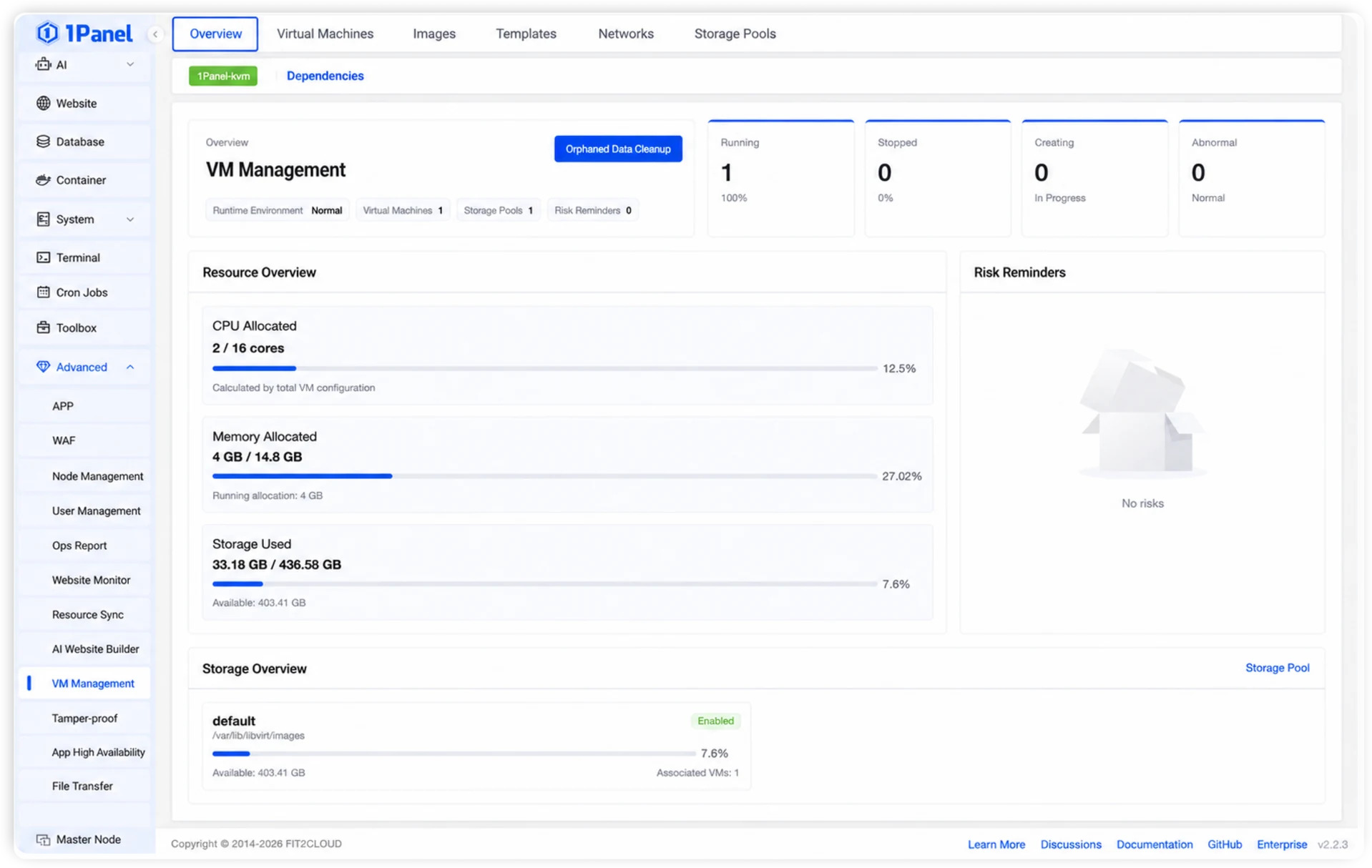
From VM running status and resource allocation to storage pool capacity and risk alerts, centrally presenting the key status of your virtualization environment.
Aggregates started, stopped, creating, and error states to quickly grasp the overall VM health.
Centralized view of CPU, memory allocation, and storage usage to understand resource configuration and remaining capacity.
Displays runtime environment and capacity risks, and supports scanning and cleaning orphan VM data.
Displays storage pool paths, usage rates, available capacity, and associated VMs for quick disk space awareness.
Centered on the images, templates, network, and storage resources needed for VM operation, providing a clear and consistent management entry point.
Supports both card and list views for centralized visibility of VM status, CPU, memory, disk, network, storage pool, and disk paths, along with creation, operation, and daily maintenance.
Centrally maintain ISO image names, types, file paths, sizes, and status, supporting server selection, local upload, or remote download.
Convert existing VMs into templates, recording source VM, resource configuration, storage pool, disk path, and template size for rapid new VM creation.
Supports creating and maintaining NAT and bridged networks, viewing CIDR, gateway, DHCP address ranges, associated VMs, and used IPs, with running status and auto-start management.
Centrally manage local directory storage pools, viewing paths, running status, capacity, available space, and associated VMs, with auto-start configuration.
Learn about the capabilities of KVM web management tools and the use cases best suited for 1Panel Enterprise.
A KVM web management tool provides a browser-based VM management interface, allowing administrators to view VM status, execute lifecycle operations, and maintain consoles and related resources, reducing dependence on the command line for daily operations.
1Panel Enterprise supports VM creation, start, stop, restart, pause, resume, force shutdown, and deletion, and provides VNC console, performance monitoring, snapshots & templates, as well as ISO image, network, and storage pool management.
They are suitable for server ops scenarios where teams want to maintain KVM/QEMU virtual machines through a visual interface. For teams already using 1Panel to manage websites, databases, containers, and server systems, they can continue to maintain VMs and associated resources from a unified entry point.
Cockpit, WebVirtCloud, Kimchi, Proxmox VE, and 1Panel each have different product positioning and use cases. 1Panel Enterprise is better suited for enterprise teams looking to integrate KVM VM management into their existing 1Panel server operations workflow.
To learn more about the positioning of different KVM Web UI solutions, see 1Panel Enterprise KVM VM Management Updates.
1Panel VM Management consolidates resource overview, lifecycle operations, VNC console, performance monitoring, snapshots & templates, as well as ISO images, network, and storage pool management into a unified interface, helping administrators maintain VMs and their associated resources with greater clarity.